A PDF drawing issue can arrive from several export runs. Some filenames describe the view, others say final, and revision labels are inconsistent. Before a handover, the recipient needs to identify the project, sheet, and issue without guessing which export a name refers to.
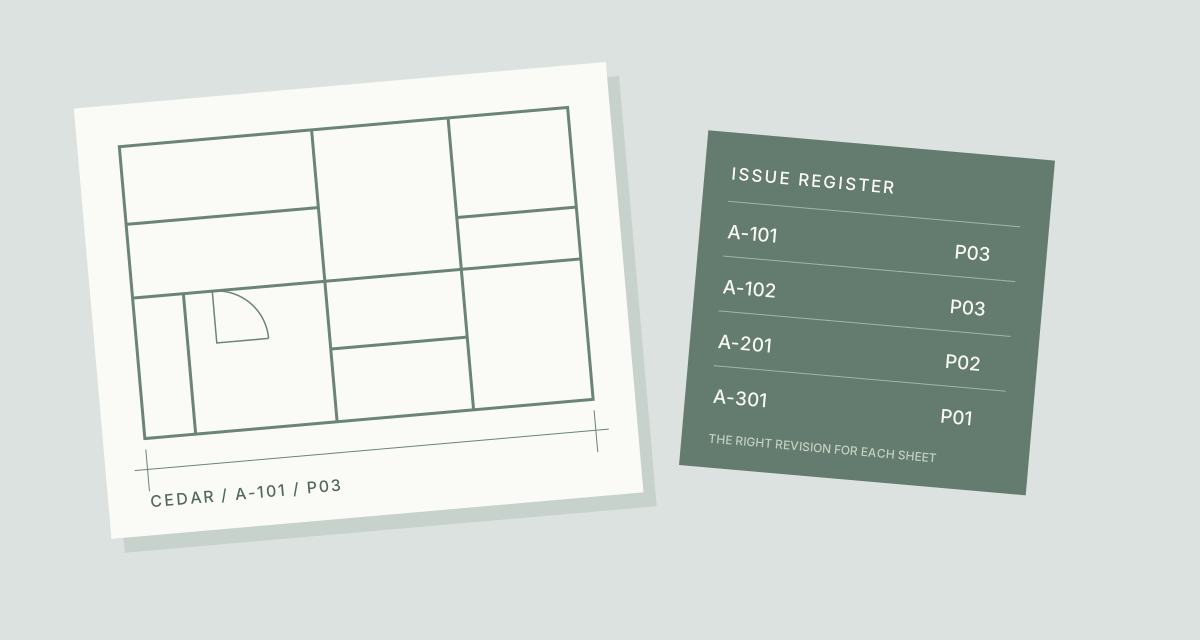
Use an approved drawing register to prepare a consistent filename mapping for exported PDFs. This fictional Cedar project uses four sheets; their revisions differ deliberately.
TreatFiles applies the names you prepare. It does not read title blocks, assign drawing revisions, or decide whether a drawing is approved for issue.
What the names need to say
Project codes distinguish files after they leave the project folder. Sheet numbers link them to the register. Revision labels distinguish issues, but must come from the checked register: do not give every PDF the same revision simply because it was exported on the same day.
Project_SheetNumber_Revision| Original filename | Proposed filename |
|---|---|
Ground Floor - Export.pdf | CEDAR_A-101_P03.pdf |
First Floor - Export.pdf | CEDAR_A-102_P03.pdf |
North Elevation.pdf | CEDAR_A-201_P02.pdf |
Section A - final.pdf | CEDAR_A-301_P01.pdf |
The examples show complete filenames. In TreatFiles’ New File/Folder Name column, normally enter the base name only; the extension is stored separately.
Keep the issue set consistent
Freeze the exported issue set
Use a copied folder of the PDFs intended for this issue. Keep native authoring files and external-reference folders outside the operation. Confirm that the register and exported set describe the same issue.
List the exported PDFs in TreatFiles
Select Rename mode before generating an XLSX or CSV list. Add the issue folder and check that only the intended deliverables appear in the list.
Build names from the register
Match each current PDF to the project code, sheet number, and checked revision. Enter a base name such as CEDAR_A-101_P03 in New File/Folder Name. Preserve the existing extension and identifying columns in the export.
Reconcile sheet-by-sheet exceptions
Check for missing sheets, superseded exports, and two PDFs mapped to the same sheet-and-revision name. Resolve these against the issue register before renaming; a tidy name does not make a superseded document current.
Apply, compare, and record the issue
Save and re-import the edited TreatFiles export, review the mappings, and apply the rename. Compare the output filenames with the issue register and retain the mapping with your handover records.
If you need the application controls alongside the example, keep the TreatFiles renaming guide or FAQ and user guide open as a reference.
Related tasks: release artifacts and project handovers.
The exceptions matter
Revision is not an export date
A freshly exported PDF may still be an older drawing revision. Use the checked register, not file timestamps, as your naming source.
Native design files need separate care
Renaming authoring files or referenced assets can break project links. This walkthrough covers exported PDFs.
A filename does not change a title block
A new revision in the filename does not update the drawing contents or establish approval status.
A sample to work from
The Drawing exports tab in this workbook contains the example above. Adapt the idea to your own files, or share it with the people who agree your naming convention.
Download the sample workbook (.xlsx) ↓This is a planning worksheet, not a TreatFiles import file. Generate a rename-ready export in the app, then put your chosen base names into its New File/Folder Name column.
Questions you might have
Can TreatFiles identify revisions in title blocks?
This guide uses revision information checked by your team. It does not assume title-block recognition or automatic revision detection.
Does the pattern follow a particular industry standard?
The example is a simple fictional convention. Use your project’s agreed naming requirements rather than treating this pattern as a compliance standard.
Why do the example sheets have different revisions?
Sheets can change independently. Keeping their checked revisions distinct avoids assigning an incorrect common revision to the whole issue.
About the tool used here. TreatFiles lists files, exports them to a spreadsheet, and applies the names you prepare. Explore TreatFiles or find it on Microsoft Store ↗.